Trendiest News in Tech

Benefits of CRM Customization

CRM solutionCustom CRM software helps a business in managing its many operations. Every company has its own number of processes that it follows on a routine basis. By automating certain tasks, a custom CRM streamlines company processes.


Customized role-specific dashboards are possible with a custom CRM. This makes the job simpler for the person in question. They can quickly access the settings and menu commands they need, speeding up their job.


A customized CRM solution is tailored to the needs of a specific industry. Each company has its own way of doing things. They have unique CRM data storage needs and produce certain kinds of business reporting.


A typical CRM application may or may not be compatible with a company’s operating processes and regulations. A custom CRM solution is required to make the most out of your investment.


Why Do You Need a Customized CRM Application?


It is not unusual to be puzzled as to why a typical CRM application fails to provide the desired results. Every company needs a CRM to manage its data. However, when you buy a CRM application, you do not think about a database.


What are the advantages of a CRM application for your company? The standard CRM software does not meet the needs of every company. A custom CRM application is required to guarantee that the CRM meets your company’s needs.


You will need a customized application that can store data about your company and produce helpful tailored reports. At the entity level, CRM customization begins. Each company has its collection of entities that it revolves around. The entities are used to create data tables. Reports are generated depending on the data types stored in your CRM.


A CRM application’s main feature is its ability to create complex data reports. The CRM offers robust reporting capabilities that may be greatly beneficial to a company.


Benefits of Custom CRM Software


Here are some benefits of CRM customization for your company if you are still storing customer data on a typical CRM app or paper and spreadsheets.


1.   Less Expensive Than Standard CRM

CRM solutions are often delivered as SaaS solutions with a monthly or annual subscription, and the price is determined by the number of users in your company. The most major drawback of ready-made CRM systems is that they are created for everyone.


As a result, even if you do not need three of the ten features available, you must pay for all ten. Keeping in mind that as a business develops, so does its CRM, and paying for more features on a big scale is a waste of money.


You can choose which features you wish to include in a custom CRM software and pay for just those. As a result, you may eliminate non-functional elements and reduce your operating costs.


2.   Less Onboard Time

When you use a pre-built CRM, there is a good possibility it will not work with your company’s current processes. As a result, you will need to hire a qualified trainer to educate your current employees and prospective hires on using the CRM.


This is a time-consuming and expensive procedure. Custom CRM software solutions are created per a company’s current processes, making it simple for employees to learn and adapt to the system. As a result, a customized solution may play a critical role in reducing the onboarding time.


3.   Seamless Integration

Since extended APIs and capabilities are more costly, you will have to pay a significant fee for an off-the-shelf CRM system to get important advantages. Furthermore, integrating a ready-made CRM is more difficult. A business will need to hire an expert to integrate required apps like Microsoft Outlook, Gmail, accounting software, etc.


By enabling developers to utilize the API-first method, a customized CRM software solution makes the integration process less costly, simpler, and more reliable.


Custom integrations are critical for a business since they turn a CRM into a custom hub that can be used by various departments, including HR, project management, supply chain, manufacturing, and so on, assisting a company’s digital transformation.


4.   Simplified Scaling Process

Scalability is a desirable feature for every company. Automation and information sharing are critical for a business’s seamless scaling; nevertheless, a CRM that can extend its capabilities to additional departments is required. Ready-made CRM, on the other hand, may face the following scalability problems:


  • You will have to purchase a new plan, which will be more costly but may not have all the services you need.
  • You will have to install additional add-ons, which will cost you a lot of money.
  • In addition, your extension must be integrated with the CRM solution.


This is where a customized CRM software solution may help. The advantages of a customized CRM system versus an off-shore CRM are as follows:


  • Custom CRM allow you to add as many users as you like at no additional cost.
  • Enhanced features, such as database management and augmented analytics can be customized.
  • You may change the custom CRM to fit your company’s needs.


5.   Enhanced Automation

Most off-shore CRMs lack automation, which is a key feature that every business needs. Without automation, sales managers will have to spend a significant amount of time inputting and arranging data. These time-consuming and inefficient tasks may demotivate the team. Among the tasks that may and should be automated are:


  • Entering customer data into the database.
  • Uploading call recordings.
  • Compiling information.


CRMs that enable automation often come with a long list of features, many of which you will not use. A customized CRM software solution allows you to automate just the tasks that are important to your company, saving you money and removing unnecessary features.


6.   Seamless Data Integration

Your current CRM may be limited in scalability, support for a small number of applications, configuration options, and maintenance expenses. As a result, you may want to consider switching to a different CRM. However, you might encounter several technical difficulties throughout the procedure, including:


  • Migrating data from an old system to a new one without losing data
  • Identifying hardware that is compatible with your CRM
  • Understand the legacy system


As a result, if you want to migrate to a ready-made CRM, you will have to hire a professional to extract and standardize the necessary data, which is a costly option.


A customized CRM software application, on the other hand, may help you in overcoming these difficulties in the following ways.


  • Custom CRM is made to allow for a smooth transition.
  • Custom CRM can be set up with a new CRM that uses a format that is compatible with it.
  • You can avoid data loss by using migration scripts for customized CRM software.


Sunvera Software develops next-level software applications from start-to-finish. Schedule a free 30-minute call with us to discuss your business, or you can give us a call at (949) 284-6300.

HIPAA Compliant App Development- A Complete Guide

HIPAA requirements

There are plenty of guides and resources on HIPAA compliant app development. But the problem of organizing the whole development procedure in such a way that it follows all terms and conditions is still challenging. That is why we have decided to create an in-detail guide about HIPAA-compliant app development and anything related to it.


Importance of HIPPA Compliance in Healthcare


The significance of following HIPAA secure apps for hospitals lies in understanding what would happen if they are not followed. In case of not following the app, hospitals are responsible for paying massive fines. The person’s data breach case can amount to $100 to $40,000 in fines.

There are various examples of how costly it gets for hospitals when they breach HIPAA compliance – on both image and financial grounds.

Making an app HIPPA compliant can sometimes pose a challenge for healthcare app developers, mainly because it asks for many modifications on both design and the features front.

Our experience of having developed many apps has helped us develop a HIPAA compliance checklist for software development.

Making a HIPAA compliant app needs to follow four primary rules:

  • Privacy
  • Breach
  • Enforcement
  • Security

As a HIPAA compliant app developer, we focus on all four rules. Healthcare app development companies’ primary workaround when answering how to build HIPAA compliant software is the HIPAA security and privacy rules. They majorly comprise physical and technical safeguards.


What Are the Steps for an App To Become HIPPA Compliant?


Following are the steps that a HIPAA compliant app development company can use for an app to become HIPPA Compliant:


1. Transport Encryption

HIPAA software needs to keep the health data encrypted in transmissions. The first step that you need to follow to get that is using HTTP protocols and SSL.

For client-server data transfer, when the data has to be transferred in the body of the post requests, you should encrypt them on the sender’s front and then decrypt them on the receiver’s side. It helps to stop the man-in-the-middle attacks. Besides, we transfer and store passwords in hash values to secure the compromising of data.


2. Backup

The hosting provider offers recovery and backup services, and it makes sure that the data is not lost in case of an emergency or accident. For instance, if the web software may send the data elsewhere, the messages get backed up and accessible to the authorized staff. For HIPAA-compliant app development, this step is essential.


3. Authorization

The team of health app experts upgrades the medical app in a way that will protect the authorization. One way is to secure the logins and audit the access control, ensuring the data can only be seen by the authorized staff.


4. Integrity

When building an app that follows HIPAA compliance, it is significant that infrastructure is set up to make sure that the storage, collection, and transfer of information is safe and cannot be changed in any way, whether intentionally or by mistake.

The first step in HIPAA secure apps is to ensure the system can detect and report unauthorized data tampering, even when the minor information is altered. Measures like regular backup, encryption, access authorization, and adequately defined users’ roles besides the restriction of physical access to infrastructure become necessary elements when making HIPAA apps.


5. Storage Encryption

The rule of facing PHI is that it must only be available to authorized staff. We cover all the information stored in the software system –databases, backups, and logs – in this rule. The professionals apply industry-backed encryption with the RSA and AES algorithms to help along with strong keys. We even use an encrypted database such as SQLCipher for saving the data on the backend safely.


6. Disposal

Significantly, the archived or backup data that have expired would be disposed of completely. We take steps to dispose of all the unused data in a non-retrievable and safe manner. For HIPAA-compliant app developers, this is also a significant step.


Tips To Make App Development HIPAA Compliant


To make an app HIPPA compliant, you should follow these tips;

  • A HIPAA or security expert should define the security needs for your healthcare app and review the app architecture.
  • Your role should be clear and comprehensive.
  • Minimize the use and sharing of PHI needed to accomplish the intended task – do not display, access, or store data that is not important.
  • Utilize a clear and effective privacy policy.
  • Risk and exposure should be reduced.
  • Avoid storing or caching PHI whenever possible.
  • When utilizing cloud storage, offer safe PHI data transmission and storage; for example, cloud storage also must be HIPAA compliant.
  • Secure data transmission and storage are also essential.
  • Under HIPAA, an agreement should be signed with any third-party providers.


What Does ‘HIPAA Compliant App’ Mean for Developers?


For HIPAA-compliant app development, we should know its significance as developers. Not all health-associated apps available in the market are HIPAA compliant. When you deal with health app development with HIPAA needs, you can store, collect and transmit PHI.

The procedure to check if your app is HIPAA compliant is as follows:

  • The app detail type (the information that is produced, stored, or shared)
  • The app user (entity) type
  • The app software type (encryption type)


Sunvera Software develops next-level software applications from start-to-finish. Schedule a free 30-minute call with us to discuss your business, or you can give us a call at (949) 284-6300.

How To Build a Custom Web Portal for Your Business

Web portalAround the world, the Internet is one of the most widely used technologies. The web has served a major role in helping businesses provide their customers with electronic access to information and services. E-business applications, although they provide many benefits, usually lose money. Providing products and services through a web portal is crucial for e-business applications to be successful. 

Businesses can reap tremendous benefits from sharing information among many, but this can also be a risk.

Having more “openness” is a good thing, but how do you achieve it without compromising security and organization autonomy? Your portal solution may fail to drive adoption if you do not work with the right company.

We will examine the characteristics of web portals as well as their evaluation criteria in this article.


What Is a Website Portal?


It is difficult to categorize what constitutes a portal, as there are many different types. It is said that portals are simply new names for home pages, but is that really the case?

User-centricity is the cornerstone of any enterprise portal. A portal cannot be viewed by large numbers of users as there is a security and confidentiality layer which prevents this.

Portal websites are claimed by companies like Netscape, Yahoo, and Excite. In spite of the fact that they do not immediately qualify as user-centric, users can still personalize them to make them so.


What Is Custom Portal Development?


You can drastically increase your reach and improve engagement with your target customers, partners, and employees by creating an engaging web portal that will act as the keystone for your digital brand identity. 

This enables easy access to a variety of functionality and content through a user-friendly interface on a secure web platform. 

Using custom web solutions, you can take your business online without limits. Creating a full-featured enterprise portal can be built after automating some business processes. 

It is possible to design and develop portals that can be used for a variety of purposes, depending on the nature of your business and your specific strategic objectives. 


What Is B2C Portal Development?


Businesses selling their products or services to the general public online or offline are known as Business-to-Consumer (B2C). Web portals that offer B2C web services are among the most inventive types of web technologies since they allow the users to engage in eCommerce, information sharing, communication, online forums, and marketplaces.

You can develop a B2C web portal with the help of a B2C portal development company that can help you leverage the power of social business networks, whether as a platform for new commercial services or as an aid to enhance the efficiency of your organization.


How Does Website Portal Development Work?


Consider a website that isn’t merely a webpage – it’s a fluid, constantly-changing nexus for all the information your customers or employees need about your business. Developing web portals has that kind of magic.

Information about many different types of topics can be found on a web portal. This type of information can include links to articles, products, vendors, suppliers, and individuals. 

Users can log in and access their own profiles when there is a membership component. Regular visitors of the portal can access RSS feeds and other types of information gathered from multiple sources. A network is a place where you can find information and communicate with each other.


Why Consider Web Portal Development?


There are many benefits to having more than one web portal, since different companies have different needs. University students might have access to one portal to register for classes or purchase dining plans, but faculty members might have access to a separate, secure portal to manage attendance, submit grades and enroll in professional development.

Many companies develop a web portal for their employees to manage workflow, scheduling, document management and even email, as a sort of intranet.

Several community websites and news publishers use web portals as a basis for their content. A rich content aggregator or publisher can manage all of the tasks associated with their role through these sophisticated web-based tools.

A portal allows you to organize your content in a way that engages website visitors effectively. They come back again and again because of the unique content you provide. 

Visitor interactions may include blogs, commentaries, social media, surveys, polls, email marketing, and guest blogging. In addition to being easy to manage once they’re set up, web portals are also capable of rapidly publishing content.

Developing web portals affords us an incredible amount of flexibility.


Sunvera Software develops next-level software applications from start-to-finish. Schedule a free 30-minute call with us to discuss your business, or you can give us a call at (949) 284-6300.

Artificial Intelligence and the Legal Profession

Artificial intelligenceIt is unworthy for lawyers to spend hours like laborers for calculations, as it could be done in no time by using modern calculating machines. Artificial Intelligence (AI) allows attorneys to lower down the level of minor tasks and free time for them to focus on client interactions and complex analytical issues. AI enhances the ability of an attorney to serve their clients, enhance their law practices, and research. It is true that law practice indeed involves a lot of documentation and paperwork.


Even simple cases involve many documents and reports. The attorney must review all the material associated with the case. It can rise to malpractice if an attorney misses or changes the key terms. To resolve this issue, AI makes it easy to review documents. In this post, we will discuss Artificial intelligence and the legal profession, its impacts on legal professional jobs and businesses. But before that, we need to understand the term ‘artificial intelligence’.


About Artificial Intelligence


Artificial intelligence (AI) involves using machines such as a robot, computer, or product and inculcating human-like qualities in that machine as how intelligent humans think. AI studies how the human brain thinks, makes decisions, stores knowledge, and learns when it tries to resolve issues. At the end, the output of this study is an intelligent software system. The ultimate aim of AI is to improve computer functions related to human knowledge. Some examples are:

  • Solving problems
  • Learning things
  • Reasoning
  • Linguistic intelligence
  • Ideologies


Due to its evolution with time, AI is classified into Artificial intelligence levels. These include.

  1. Artificial Narrow Intelligence (ANI) This first level, as its name suggests, is restricted to only one functional area and has a limited scope.
  2. Artificial General Intelligence (AGI) This level of AI is at an advanced level: it covers more than one field, which includes reasoning power, abstract thoughts, and solving problems.
  3. Artificial Super Intelligence (ASI) This is the final level of AI eruption. At this level, AI spreads human intelligence everywhere, across all fields.

The journey from the first level to AGI has taken more time. Now we are about to complete the second level of AI, where humans and machines will be equal in terms of intelligence. In the future, all the artificial intelligence levels will be achieved if we understand its importance fast enough.


How Does AI Benefit Lawyers?


Artificial Intelligence (Al) saves most of the attorneys’ time, which allows them to easily focus on other tasks, such as advising their clients legally, spending time in court, and negotiating deals. AI has taken away the complex process of reviewing and managing documents within complex contracts and a considerable process that attorneys do on behalf of their clients.

There is a strong relation between artificial intelligence and the legal profession of practicing law. Law is also based on predictability. Here, artificial intelligence can assist in many complex and repetitive tasks with magnificent results in predictability.


How Does AI Benefit the Business Sector?


Artificial intelligence can be used to help select and develop contracts when doing business with a new customer. AI can also be used to send alerts before important dates in contracts. This helps a lot for a business to manage an agreement effectively. The primary goal in business is to know the risks and problems involved in contracts and how contracts will be revised to deal with negative impacts for clients.

AI helps sort out issues fast that are mostly ignored or overlooked by human eyes. It clears all difficult points in contracts and makes them crystal clear and easy for both parties as business contracts are becoming more lengthy and complex in our economies. Artificial intelligence (AI) can help both parties draft those contracts by taking clauses for applicants to give a condition; here, AI benefits the attorney to focus on the most important new points while making a mutually beneficial agreement.

In drafting contracts and agreements, consistency is also a key factor. For example, suppose a client or a party wants a term in a specific manner throughout the agreement or contract. In that case, we must ensure that it should be accurate and should be incorporated promptly because any variation here could prove damaging. Artificial intelligence (Al) software ensures the consistency of these terms while also identifying any variation with a warning.


Artificial Intelligence and the Industrial Unit


Artificial intelligence offers excellent potential for industries. It is already ensuring that the production of goods is more reliable, efficient, and flexible. The material for production finds its way in the hall on its own. Optimization plants consume their power during their live operations, and operating machines check the quality and make essential adjustments.

Industries are rapidly running towards digitalization where data is continuously produced, processed, and analyzed. Here, operating machines are programmed to design and structure the products and pieces of machinery.


Artificial Intelligence Unleashes Financial Opportunities


Artificial intelligence not only captivated the minds of industrial units and delighted scientists, but it has successfully delighted people in business. AI is rapidly becoming a massive sector that will bring financial opportunities and growth for industrial sectors, and benefit both businessmen and industries with its technological power.


Bottom Line


Artificial intelligence (AI) has been the research focus for nearly three decades. During this period, significant advancements have been made towards this useful game-changing technology in the following fields: data transmission, computer generations, more robust software, and hardware.

With AI, the complexities which humans were facing and taking a lot of time with has run away. AI eases human efforts, and this emerging tech trend has become helpful for lawyers, the business sector, industrial units, and many other verticals. In the next three to five years, we will see a massive growth in the use of AI in our daily lives.


Sunvera Software develops next-level software applications from start-to-finish. Schedule a free 30-minute call with us to discuss your business, or you can give us a call at (949) 284-6300.

Benefits of Custom eLearning Solutions

eLearning


Custom eLearning solutions explore the different ways of strategy in coaching. Learners want to know that you respect their time and that they are only providing the experience and information they need to grow in their position and excel at work. If not customized, learners can eliminate information that is no longer needed, no matter how valuable it is. eLearning modules can combine attention, consideration, and concept learning. These modules create a very accessible and perfectly balanced system to provide the right combination of content, context, and impact for very dynamic training from the beginning to the last piece of information provided in the courses.


Custom eLearning Solutions


The following are some benefits of custom eLearning:


Provide Performance Support

Custom eLearning solutions enable you to create engaging, interactive, fun, and exciting content that goes beyond simple training, enabling your learners to take the initiative and apply new knowledge to their work. For example, a custom eLearning solution includes ongoing performance support in the form of apps, video libraries, resource centers, how-to guides, checklists, etc. It not only provides training but it’s also designed to provide accurate information when learners need it most.


Improved Learning Efficiency

In off-the-shelf training courses, the likelihood of getting the information that applies to the learner is very low, unless the topic is a general one. As a result, learning is a waste of time and resources and affects the company’s bottom line. A tailor-made eLearning solution is the best solution for your employees because it provides exactly what you need to know.


Increased Engagement

According to a Gallup survey, only 34% of American employees are enthusiastic about their work. Textbook-like training is boring and may not convey excitement for the workplace. Custom eLearning allows you to see learners as individuals rather than checklists, and to enhance interaction and engagement through proper training.


Focus on the Target Audience

There are no similar organizations in the world. Each organization has its unique traits.  It makes this almost guaranteed that there is a gap in existing training products. Different qualities may be their powers, defects, support, and expertise. Therefore, when you think about training such as compliance, legal, accounting, onboarding, and safety and health, the general approach will be more harmful than beneficial. The best way is to establish contact with a qualified eLearning material developer. They are responsible for examining the public and compose a custom eLearning solution for excellent results. This advancement in design shows the optimal results after the course implementation.


A Personalized Approach

Custom eLearning will also allow you to customize the content separately for each student or employee. Based on your learning path, learners can choose topics, take time, and move forward quickly. Due to this personalized access, managers improve their abilities on an individual level to show the best performance.


Overcome the Practice Time

Almost every organization spends the most time on the training of their new employees. Sometimes, all the employees need different types of training and spend a lot of time training for their role. Custom eLearning enables the company to design the content separately with engaging themes for each employee. Custom eLearning reduces training time without lowering the value of training. It increases the efficiency of the employee and also saves time.


Easy To Update Content

With ready-to-use eLearning, it is almost impossible to tweak your content to make it current. Custom content always delivers fresh and up-to-date training. When content needs to be modified, you can save time and money by adapting your custom eLearning to make only the latest changes rather than looking for an entirely new course.


Custom eLearning Course Development


Step 1: Program Objectives and Limitations

As with other complex projects, the first step in eLearning development is to plan your destination. Start by understanding the overall picture of what the program will accomplish, what will be achieved, how it will measure and what is to be gained. This gives an idea about the program’s modesty as budget, timing, and schedule.


Step 2: Cultural Compatibility

Once you’ve determined the purpose and limits of the program, let’s think about the company culture. Think about the vision of your company. What are the values of your company? How can eLearning modules enhance this basic information? What about other learning initiatives?


Step 3: Learner Needs

Spend sufficient time investigating learners. What are their key issues and knowledge gaps? How is that measured? What prevents you from learning or applying what you know? Make a sheet that accounts for the qualities, professional capabilities, content practice, and activity of learners.


Step 4: Content & Strategy

So far, we’ve looked at the organization as a whole and the group of learners. The next step is to focus on content. What topics and sub-topics do you need to teach to solve the learning gap? Generate a separate folder that includes source data for creating the storyboard and share it with developers.


Step 5: Storyboard & Design

All of your work in analyzing, programming, and organizing up to this point will affect the teaching design of the storyboard.

When designing a component scenario, consider the following key elements:

  • A perfect script to tell stories
  • Graphics of software
  • Animated videos and photos
  • Display text on the screen
  • Sound effects for greater engagement
  • Soft music for relaxation of the mind
  • Interactions between students
  • Evaluations, feedback, and correction
  • Assessment and next steps


Step 6: Expand

Before the storyboard takes you to the development phase, you must think about how the student will see the unit: laptop, mobile device, or both? Use your preferred device(s) to place the elements on the screen, create interactions and ratings, and match animations to audio narratives.


Custom eLearning Approach


eLearning requires some improvements to gain the perfect position in the market. This strategy presents an advanced and perfect digital training practice, so it gives higher action, complete learning, and active recalls. Our approach for eLearning is following:

  • Understand the learners
  • Make a connection between learning and actual performance
  • Provide realistic practice and feedback
  • Leverage interactivity to engage deeply
  • Use storytelling power
  • Examine the performance of learning
  • Apply multimedia approaches to learning


Sunvera Software develops next-level software applications from start-to-finish. Schedule a free 30-minute call with us to discuss your business, or you can give us a call at (949) 284-6300.

Fixed Price App Development

Fixed price model


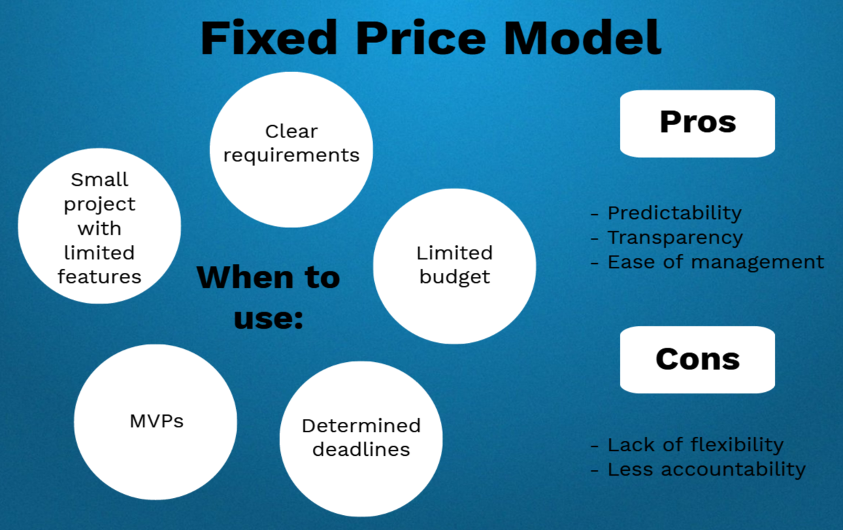
Fixed pricing is not just a pricing model for custom application development; it is a clear commitment to the project process and all stakeholders. The well-known triangular constraints of project management (scope, time, and cost) are all fixed. You will not go over the budget, and that will be the most favorable outcome for both parties. First, you need to define a scope. The client presents the product requirements. The supplier calculates the price and timeframe. This makes it easier for project managers to control the app development process. The supplier bears more risk, and the team maximizes the accuracy of the estimates.

To understand how to make a fixed-price custom project successful, let’s take a closer look at the app product development process with specific details related to this contract type.


How are fixed-price projects run?


1. Fixed-price projects do not start without fully documented requirements.

  • Product specification detailed requirements: All product specification requirements need to be properly documented before development begins
  • UI/UX Design – The mock-up of the app product is ready for implementation.
  • Acceptance Criteria: Define what is to be finalized. Acceptance criteria include a checklist of actions with expected results, selected test devices, supported browser and platform versions, and so on.

These requirements must be created by the clients or elaborated, clarified, and approved by the supplier. Once the scope is finalized, then UI/UX design and development can be estimated. Clients and contractors need to know exactly what to look for and agree on it.


2. Fixed-price projects typically include a fixed scope divided into milestones showing the type of collaboration:

  • Goals
  • Interim results
  • A work and payment schedule
  • Possible risks and their solutions
  • Acceptance criteria
  • Work procedures for change requests


3. Advance payment.

In general, you pay 50% in the start. Additional charges will make upon the achievement of each milestone.


4. Implemented Functionality

The result of each milestone is an intermediate product with implemented functionality. They are provided to the customer to check progress.


5. Change Requests

Changes to requirements are controlled by change requests, which are additional contracts created by the project manager. Since changes in the development process affect the scope and app development costs, the team will re-estimate and include them in the change request. The clients will then be either approved or rejected, and the development will proceed according to the initial approval.


6. Alpha Build

Another milestone is an alpha build with all the features implemented. The team verifies that the outcome is working perfectly on the test server.


7.  Refinement & Polish

The last milestone is refinement and polish. The beta (final version) is complete. The outcome is to keep the clients’ actual work environment on the production server.


8. Acceptance Period

After providing the final build to the clients, the project enters the acceptance period. During this period, the clients will check the product by approved acceptance criteria and provide feedback to the contractor. The acceptance period is typically five days. If there is a bug in the approved test equipment or a mismatch with the checklist is found, it will be fixed by the contractor and the clients will not have to pay any additional costs. The time taken for these corrections is not included in the acceptance period.


9. Final Payment

When the testing period is completed, the contractor receives the final payment, sends the source code to the clients, receives feedback, and finalizes the project. At this stage, the custom product is deployed to the application store and is provided as a stand-alone operation at the demand of clients by standard contract pricing.


What are the risks of developing apps at a fixed price?


  • Scope-related risks are borne by the clients. This risk is solved by the ‘Change Requests’ and affects the cost.
  • You are responsible for the risks associated with third-party services. Third-party services must operate under certain approved conditions as defined by the client’s product requirements. The contractor must recognize them from the start.
  • Human risk factors are assumed by the contractor. These are not the costs of app development, but the schedule. If the developer is unable to perform the business, we will alert the clients and select an alternative.
  • You are responsible for the risks associated with third-party libraries, services, APIs, SDKs, and other tools that you choose to develop. They do not affect cost.


What’s the next step?


After delivery, you will receive feedback from users, bug reports, new feature suggestions, etc. Your understanding of product concepts and features may change. It can also change with changes in business and technology, so clients have two choices. You can either continue iterative app evolution or hire a team for minor updates and fixes (typically 12-24 hours per month). The price is equivalent to the standard hourly wage of the contractor.


Conclusion


The main problem with the fixed app development price is that the clients are almost inflexible. Flexibility is needed for medium and large projects in which business and technology conditions are constantly changing. In opposition, fixed costs are proper for short and smaller-sized plans that need an average of three months, many documented terms, and little backend thought. Most importantly, the fixed plan does not allow for change and flexibility, allowing you to react immediately to any change in the market. It does not make it easy to maintain product relevance. If a particular project is suitable for a flexible price system in terms of both requirements and costs, this is a better option for clients. The lack of budget changes during the project period means that software developers must anticipate and prepare for all possibilities. In other words, the price of a fixed price model must include reserves to avoid any risk.


So which pricing model should be used for custom app development? Agile app outsourcing companies tend to avoid fixed-price projects. This is because there is no changing weather in the world of custom app development. In the world of custom app development, there is no weather without change. If a custom product needs to evolve, iterative development is the preferred solution. You can respond fast because you do not need change requests or long re-quotes.


Sunvera Software develops next-level software applications from start-to-finish. Schedule a free 30-minute call with us to discuss your business, or you can give us a call at (949) 284-6300.

Ideas for Healthcare Apps

Healthcare

If you want to be innovative as a small or mid-sized healthcare organization, but do not believe that there are any unique healthcare apps to be developed, think again. There are plenty of fresh ideas for medical applications in your healthcare start-up. You can either develop an app specific to only your organization, or you can choose to be the next WebMD.


Classification of Healthcare Applications Has Two Basic Concepts:


  • Applications for doctors
  • Patient aid applications


These concepts allow you to form a perfect idea for the designing of healthcare apps.

The idea of these applications has numerous benefits in the medical field, such as:


  • Patient healthcare
  • Customer maintenance
  • Secure conversation
  • Efficient record-keeping
  • Medication program
  • Overcome clinical admittance

1. Doctor Consulting Application

Ever since the pandemic began to spread, on-demand applications have been all the rage and medical consultation applications have been the medical industry’s primary representative in this category of applications. Healthcare apps are the bridge between doctor and patient. Consulting apps allow doctors to easily give their attention to everyone.

After all, there is no shortage of patients willing to pay the price just to be able to get professional advice in time. However exaggerated it may sound, it is partly true, because it may mean the difference between life and death for many patients.

An untimely health problem can be very inconvenient. For example, if you are feeling pain in the legs or the stomach late at night, you cannot concern the doctor at that time. So, in this situation, a healthcare app will assist you. An app with a call option for the physician is useful. You can log into such an app anywhere at any time and get the help you want.


Main Key Points

  • Make an appointment with the doctor online. An app with video call features and chat promotes a healthy relationship between doctor and patient.
  • The payment method in the app allows you to perform online transactions.


2. Application for Health Alarm / Notifications

People are too involved in their life and sometimes skip their routine checkups. When is the last time you had your physical? Dental appointment? Eye examination? A ‘health alarm’ or notification app warns you about your medication according to your given input dates. Whether it is a checkup or reminders to take your daily medicine, these types of health notification apps come in handy for pretty much everyone.


Main Key Points

  • A ‘health alarm’ application can serve many purposes, including reminding you of daily medications, or documenting any checkups you need, and the last time you had a certain type of checkup.
  • All people do not have the same health condition so, they also need different types of consulting for their health. This app can be very customized according to the user and their needs.


3. Personal Examining Applications

Recent cell phones also have a default healthcare app for monitoring the physical conditions of the patient. However, these apps can be very limited in functionality. But this gives an idea on how to design an application for the users to test their health at home. Patients also do not want to be dependent on others often just for routine health diagnostic tests. People with diabetes and high blood pressure can certainly benefit, for example. Personal examining applications can ask questions that allow for accurate health advice.


Main Key Points

  • Personal examining applications enable the patients for regular checks up at home. You can also take action by results from the app.
  • These applications save the time of patients for regular checks up. They do not have a lot of time to visit the doctor.


4. Application for Patient Records

It is undeniable that the ability to understand medical data is beneficial not only for patients but also for caregivers. Planning a medical record application not only makes it easier for patients to understand their health status, but also facilitates data sharing with doctors. Medical records are significant for both doctors and patients. The idea of these consulting applications empowers highly in strengthening medical systems.


Main Key Points

The basic concept of medical records apps is to assemble necessary health information from patients.

  • Users can also input their health report in the app anytime
  • When an appointment with a medical professional is needed, the data can be shared with the medical professional.
  • With patient health records, physicians can analyze the patient’s condition and give him or her suggestions and treatments.
  • This saves the time of patients and doctors. It also empowers the doctors to take any actions that are needed.


5. Medical Dictionary and Informative Applications

Medical dictionaries and informative applications are great ideas for some young doctors.

Medical references provide valuable information to doctors, so this is a particularly important type of healthcare mobile application.


Main Key Points

  • Medical dictionaries and other similar informative apps provide important info which can help further train doctors and physicians
  • There are not enough apps such as these in the market, so this type of application does have a higher demand


6. Medical Training Applications

As a doctor, you are liable for someone’s life. The doctor must do all his actions efficiently and accurately. This requires practice and you can be trained in surgical procedures with the help of medical training applications.


Main Key Points

The idea of a medical training application is convenient for physicians.

  • Doctors and interns can study how to operate with this application.
  • These ideas empower young doctors to master the surgical procedure without implementing it on patients physically.


7. Health Tracking Applications (IoT Devices)

One of the top healthcare application ideas is to build a health tracking app for doctors. This will help them monitor the patient’s condition closely and continuously.


Main Key Points

Healthcare tracking apps are most likely to succeed. Through health tracking applications and smart wearables, doctors can carefully check patients. These applications track all the health data required by the patient. Smart wearables are also used to track user vitality in real-time, including:

  • Heart rate
  • Pulse
  • BP
  • Blood sugar level

This allows us to provide appropriate care to patients as needed.


8. Medical Translation Apps

Language is no longer a barrier! With medical translation apps, you can be sure that your healthcare services will be easily accessible to those who do not speak English as well. These types of healthcare apps are extremely underrated, and doctors and physicians have not yet grasped the importance of such apps. You can start serving more patients with medical translation apps!


Main Key Points

  • In the United States, many patients are blocked by language barriers and unable to consult doctors about health problems.
  • Therefore, doctors need to use translation applications. This empowers doctors to recognize the patient and appoint the therapy they need in their language.


Sunvera Software develops next-level software applications from start-to-finish. Schedule a free 30-minute call with us to discuss your business, or you can give us a call at (949) 284-6300.

How to Create a Taxi App in 7 Steps

Taxi App

The ride-hailing industry has become one of the most potential markets for entrepreneurs. Easily accessible digital solutions have made it possible for everyone to join the market with the least capital. Launching or creating a taxi app does not require millions of dollars anymore.

Market analytics indicate a huge growth in the demand for taxi services in the upcoming years. Current traffic conditions in every region have forced consumers to shift to convenient services. There is nothing more convenient than hiring a taxi with a few clicks on your smartphone. Uber, Lyft, and many other ride-hailing apps are the perfect business models that generate millions of dollars in revenue.


How to Create a Taxi App?


Not having a strong digital presence can throw your business out of competition.  You must invest to build an app like Uber that ensures better and optimized ride-booking services for the users. The whole process of creating a taxi app is divided into seven primary steps.

Instead of going into the technical details of taxi app development, we are going to talk about strategic steps that lead to a successful taxi app launch.


1.    Identify the Pain Points and Gaps in the Current Market

No service, product, or app is perfect and there are always certain points where consumers have to compromise. Market analysis will require a deep understanding of the target market and what they expect from a taxi app. Taxi booking app builder companies can help you to identify the unique aspects of the target market.

The ultimate goal of this initial step is to make your taxi app stand out from the rest of the competitors. Great market research is the first step towards a successful taxi business.


2.    Determine the Expertise of your App

A generic taxi app like Uber or Lyft will offer different general services. Competing with industry giants is a lot easier when you focus on micro factors. You need to understand and implement features and services that make your service worth it and better than the competitors. The taxi app developer can create customized apps and digital solutions and you just need to come up with a creative idea for the app.


3.    Revenue Model and Business Strategy

Revenue generation is the ultimate goal of every business and service provider. Apart from development, this is one of the most complicated and critical steps in the taxi business development. Different ride-booking services follow different strategies and models to generate income.

Make sure that your deliverables offer a significant ROI for the customers and the business model improves the traveling standards for the users.


4.    Creating App Documentation

No project can deliver the desired results without professional technical documentation. Everything will be explained in the documentation, including taxi app features, business model, revenue generation features, and development timeline.

You will explore what features and services you are going to offer and how will you make it happen. A professional development company will use this documentation throughout the development phase as a guideline.


5.    Get your Taxi App Ready

Taxi booking app solutions require proper research and understanding of the ride-booking industry. Only taxi app development experts can deliver the desired results and a fully functional ride-booking solution for smartphone users. Not every user is tech-savvy so the diversity of the audience must be considered in the development phase.

From UI to UX, every minor and major aspect of the ride-booking app should add value to the users’ experience. Most intelligent businesses fail due to a lack of proper digital existence. Taxi apps should be supported by all available devices and operating systems in today’s market.


6.    Market your Taxi App

Let the development team do the magic. Depending upon the compatibilities of the developers, the final app will be ready in a few weeks. The next step is to get an audience and exposure in the right market. There are certain marketing strategies for taxi apps. We are going to explore those options in the next section.


7.    Build a Brand from the Taxi App

The real challenges begin once the app is available for the users in the market. The marketing and development team needs to keep regular checks on the reviews, issues, features, and performance of the app in the market. Some challenges may arise with time but the developers should resolve these issues ASAP.


What is the Average Development Cost for a Taxi App?


Depending upon the target market and your development company, a fully functional taxi booking app development might cost $67,000 to $150,000. The final cost may vary depending upon your custom requirements for the features of the service.


How to Market a Taxi App?


Promotion and marketing campaigns for the taxi app are going to take some time. In the initial phase, you might have to offer special discounts and coupons for the customers. After the development phase, marketing strategies are going to define the fate of your taxi app. Here are some practical marketing tips for taxi apps:

  • Create and design creative branded booklets for distribution in local areas
  • Create digital and hardcopy flyers with the promotions and discounts
  • Spend on paid ads to promote your taxi app on Play Store and App Store
  • Spread the word on all social media platforms through content and ad campaigns
  • Collaborate with local businesses to get more exposure for your app

Apart from these primary steps, a complete marketing strategy should be designed. In the end, stronger marketing strategies are going to yield results and revenue.


Is Creating a Taxi App Worth it in 2021?


Current economic uncertainty has forced consumers, businesses, and the general public to think about different income streams. As transportation is one of the main pillars of modern society, taxi apps are going to thrive in 2021, and 2023 is said to be the peak year for such services.

Uber-like taxi apps can help you to build an established business from scratch. Now is the time to create a mobile app like Uber, but you want to ask yourself what new features you are offering for the public that do not currently exist.


Sunvera Software develops next-level software applications from start-to-finish. Schedule a free 30-minute call with us to discuss your business, or you can give us a call at (949) 284-6300.

How To Make an App Like TikTok

App like TikTokMusical and lip-sync apps are already gaining worldwide popularity. Retro cube app developers and specialists can help you create unique features and content that enables millions of users to use your app and view clips. Why not try to rank your app in the top tier on iOS and Android app stores? Here are some main features of TikTok-like apps:



Comfortably Construct Contents in a Short Time

Every time you open the app, you’ll be directed directly to a full-screen video that keeps swapping new 15-second clips from the feed that ends seamlessly with the trend. This is a unique concept.

The development of mobile apps like TikTok is super easy as there is a selection of editing tools and rich prompt ideas for mobile.


Target Audience

Unlike many other social media platforms that target all ages, TikTok targets millennials who always want to express themselves on social media.

They are people who rely more on smartphones and are constantly checking their phones.


Chance of Making Money

Tiktok offers a variety of opportunities for fans and followers to earn money. People who have more than 1000 followers can also enjoy the live streaming feature.

Viewers can purchase and send a virtual gift with gratitude. Users can claim cash when they received gifts equal to the amount of 100$.


Collaboration With Brands

Companies such as Coca-Cola, Gucci, Samsung, and Panasonic are committed to Tiktok as a powerful social media platform, especially Tiktok to promote their marketing campaigns.

In this way, we have acquired millions of potential customers. In addition, to attract more users’ attention, the app has partnered with Instagram’s prominent influencers. Celebrities like Ariana Grande, Jimmy Fallon, and Kourtney Kardashian are frequent users of Tik Tok.

In addition, there are features such as fast image capture, music video broadcasting, great filters, and a music library that is picked up every day from the editor.


Sounds interesting, right? So let’s go even further and get some insights.


What You Need To Make an App Like TikTok


Login and Registration

Each app has the initial login and registration feature for using the app. It contains different criteria for registration.

This can be done via other social media accounts like Facebook, Instagram, Twitter, or just via email or phone number.


Simple User Interface and Navigation

Pick a mobile developer who thinks of providing a simple user linkage. When the user signs into the app, they can see all trending videos. As you scroll through the screen, you can watch videos one after another. Follow the people you like and set the screen so you can see the videos of the people you follow.


Overcome the Mental Burden

The mental burden is the amount of brain required to adopt an app. The mind has bounded processing capability. Apps that provide a lot of information at once are more burdensome to users and they tend to uninstall them. Therefore, try to minimize the cognitive burden.


A Clean and Clear Look

Clutter is the most prominent opponent for superior design. If the interface is messy, the user cannot get information such as buttons, images, icons, etc. at once, and the screen looks too dense. Therefore, you can improve your understanding by removing these types of things.


Reduce Task Load

Make an app that reduces the managing efforts of users. Users can access the last viewed video easily and TikTok also uses this smartly. Instead of having the user re-enter it, you can set it as the default with the help of the previously entered data.


Split Tasks Into Bite-Sized Pieces

Chunking helps to connect two different activities. If the flow is logically connected, it makes it easier for users to move forward.


Familiar Screen

Users get more comfortable when they see a view that they are used to seeing on most apps. Introduction screens such as the homepage / feed are the de facto standard for social mobile apps. Avoid any unusual information screens that create problems for the user. If you decide to use ads inside the app, do not overdo it to a point where users start getting confused.


Avoid Unusual Languages

Clear communication is a top priority. Android and iOS mobile app developers are mindful of this feature, which has led to a big hit with TikTok.

Ask your developers to use words and phrases that they think are appropriate.


Design Flexibility

Flexibility is the basic principle of design. Flexibility can also remove troubles. App developers need to make sure that the app has:

  • Visual Consistency: Make sure all badges and tags flow together well, and do not look like they are all from separate apps.
  • Operative Flexibility: All interactive elements should work across the app.
  • AI-Based Support: TikTok uses artificial intelligence to automatically analyze users’ interests and preferences based on their interactions.

You can also see that the TikTok app page “For You” provides the most relevant content to users. TikTok begins following users when they initially install the app and makes complex standards of what users like to see.


Hashtag Challenge

Hashtag challenges serve as a way to bring together communities for your app. Challenges allow users to compete against each other on a particular topic.


Duet and Reaction

In the duet, you can split the screen with someone else’s video, such as a friend’s or celebrity’s video. The original video plays on one end of the screen, and your video plays on the other end of the screen, both at the same time. If you like someone’s video, you can also create your own and add a touch to it. The reaction is very similar to a duet, but it helps you record a video while watching a clip. You can change the shape and size of the reaction window and move it on the screen.


Built-In Music Library

What is a lip-sync app without a grand music library? There is a long list of filters to choose from, including AR effects, editing tools, animations, stickers, and more. Before recording, the user chooses a song to perform for lip-sync, dance, or music. If you want to shoot something immediately, you can also add background music later.


Share

It’s meaningless if you think of something great but cannot share it. TikTok understands this well and has a sharing option. This feature helps you to share videos on other social platforms such as Facebook, Instagram, Twitter, Whatsapp, etc. and through email.


Pricing


The mobile app developer must understand the potential users before choosing a business model. Here we will introduce the monetization strategy.


  1. Financing: In the early stages, it is important to attract investors for funding. Even for TikTok, funding is one of the premium models.


  1. In-app billing: With TikTok, users can use coins to support live broadcasts or buy real money. Coins are exchanged for gifts, and users can easily give them to others during their live stream.

According to Sensor Tower data, 100 coin bundles are the most popular among users, followed by 500 coin bundles sold for $4.99. You can use the same monetization strategy for your app.


  1. Advertisement: App monetization offers a good choice including various types of in-app advertising.


  1. Cost per Click: Advertisers pay for each additional feature that comes in between the app users.
  2. Cost per action: Advertisers pay for clicks that lead to specific actions, such as installing apps, submitting forms, or registering websites.


Sunvera Software develops next-level software applications from start-to-finish. Schedule a free 30-minute call with us to discuss your business, or you can give us a call at (949) 284-6300.

Mobile Testing Automated: A Complete Guide

mobile app testingAs mobile apps continue to be the major business enablers, all business sectors today are surrounded by numerous mobile apps. As smartphone usage has boomed around the world, businesses have continued to expand their operations by enabling mobile apps.


 

Mobile apps are being used heavily across industries as a result of the widespread usage of these smart devices.


What is Mobile Automation Testing?


Mobile application development includes testing all the key features of mobile apps on handheld devices, which is the main process involved in the development of mobile apps.


This includes the ability to load on a variety of browsers, operating systems, and mobile devices, as well as its functionality and usability.


In essence, mobile app testing is done with a variety of mobile automation testing tools to make sure the apps are flawless and perform well regardless of the load.


Automated testing of mobile apps is a type of mobile testing using mobile testing tools. Businesses can ensure that their mobile apps are bug-free if they leverage automated testing (e.g., app store or play store) before releasing to the market.


Importance of Mobile Testing 


The number of smart phone users across enterprises of all sizes has resulted in mobile applications growing as a means of fueling business operations and enhancing customer service. The purpose of the task a mobile app user wishes to accomplish and the ease of its usage determine which app a user will download.


The app rating and review plays a key role for a new user to choose mobile apps today, as there are millions of mobile apps out there.


To ensure the app is fully tested with the use of effective mobile automation testing tools, it is primarily important to undertake mobile automation testing during the app development phase.


Automated tools are used to test mobile applications and ensure they work flawlessly.


Automation is a key component to achieving the following characteristics for businesses


App Functionality

App functional testing ensures that the mobile application conforms to the specification outlined in the design document.


App Performance

Mobile performance tests assess how well the app responds, where it runs in terms of serving clients, and how scalable it is when it is under loads of users.


App Security

When testing the application, data integrity, storage security, and checking the validity of any tainted inputs are verified.


App Usability

Testing apps for usability automation is especially important today because mobile apps that provide a great user experience are preferred more. Therefore, the automated accessibility test ensures users can successfully perform their intended tasks on the app.


App Accessibility

The accessibility and usability of apps is a mandate for today’s different-abilities population. For all users to have standardized accessibility, certain standards and regulations need to be followed. Automating the testing of mobile apps for accessibility is therefore a good idea.


Across Browsers, OS, Various Mobile Devices

It is crucial to conduct mobile testing using different test automation tools to ensure that apps work across browsers, operating systems, and mobile devices in a variety of scenarios such that they are easily accessible for different types of users.


With mobile test automation, businesses gain these major benefits on top of everything else:

  • A more efficient testing process
  • Improved coverage of tests
  • A faster time to market.


In addition, flawless mobile apps ensure cost-effectiveness and fast return on investment. To ensure high-performing apps, mobile testing automation tools should be employed by businesses.


How Automation Works


As many mobile apps fail because the test automation strategy is not followed, it is not enough to build an app that has all the features. The following phases are necessary for the testing of mobile applications to be successful.


Phase 1: Effective Planning & Identification of Testing Types

To test mobile apps properly, it is important to select the right target devices. You should check whether the mobile application is native, hybrid, or mobile web.


In addition to back-end testing, proper planning should also include front-end testing. Testing types should also be categorized, as well as which functional requirements should be tested.


To ensure better app testing outcomes, devices with different sizes should be selected for testing.


Phase 2: Ensure Effective Test Case & Test Script Development

Each application function must be covered by test cases. The battery usage, speed of the app, and memory usage should be taken extra care of when considering test cases. It is crucial to develop automatized test scripts that can be reused and adapted to the needs of the project.


Phase 3: Plan for Test Environment Setup

Set up the test environment on the testing device by downloading, installing, and configuring the application. Before you start testing, you should also ensure the test version of the app has been established.


Phase 4: Perform Automated Testing

Appium, Selendroid, and other mobile test automation tools are used to automate testing for iOS or Android applications. These are tested to make sure all fundamental functions are working correctly.


Phase 5: Perform Usability & Performance Testing

To ensure a good user experience, usability testing should be undertaken once the basic functions have been tested. To ensure that the app performs flawlessly even when multiple users are logged in at once, performance testing should be carried out with mobile performance testing tools.


Phase 6: Perform Security & Compliance Testing

Tests are conducted to ensure that the application is secure and does not leak any data. Through SQL injections, session hijackers, etc., this is accomplished. It is also important to conduct compliance testing.


Phase 7: Perform Accessibility Testing

With the number of users accessing mobile apps globally today, it is also vital to perform accessibility testing to ensure that the app can be used by people with disabilities, by adhering to certain accessibility norms.


Phase 8: Perform App Testing Across Devices & OS

The app should be tested across multiple devices and operating systems, and all test scripts should be run across different devices & OS to ensure they run correctly across multiple devices & OS.


Top Tools and Frameworks for Automated Mobile Application Testing


Testing a mobile application can be done with different tools and frameworks. There are several popular ones, including:


Appium

Testing mobile apps with Appium, an open-source tool, is a popular practice. A developer can use Appium to test their iOS and Android applications, whether they are native or hybrid. Appium is not a stand-alone app.


The WebDriver interface is used to run the test cases. In addition to combining iOS and Android testing by using the same code, testers can reuse their existing source code.


Calabash

Testing mobile apps using Calabash is possible in multiple languages. .NET, Ruby, Java, and Flex are all supported. Native touch screen applications can be enabled using APIs by testers. It provides libraries that allow scripts interacting with native and hybrid apps to be programmed.


Selendroid

Mobile apps for Android are also known as Selendroid. Mobile application testing can be done with Selendroid for native and hybrid apps. Similar to Selenium for cross-browser testing, Selendroid can run parallel test cases on multiple devices.


Espresso

The Espresso testing framework is a great tool for automating the testing of User Interfaces (UI) of mobile apps, since application developers and app testers use Espresso extensively to test the user interface of applications before they are deployed.


An interaction may be recorded by developers when creating a scenario. To add assertions, developers must capture snapshots of the UI elements within the app and verify their behavior. As a result, they can use the tool to create UI test cases for testing their application.


Robotium

Android apps can only be tested using Robotium, an open-source test tool. Java is used to write the test cases. Black-box testing is one of the main reasons why Robotium is popular. An android tester can automate multiple activities and write a test case in a minimal amount of time with this tool.


These are just a few examples of other popular tools, such as Monkeytalk, Testdroid, Frank, and UIAutomator.


Sunvera Software develops next-level software applications from start-to-finish. Schedule a free 30-minute call with us to discuss your business, or you can give us a call at (949) 284-6300.

Ready to discuss your project? Contact Us